#Post Title #Post Title #Post Title
Wednesday, 10 October 2012

Hack Admin Password From User Mode


Hack Admin Password From User Mode
Follow these steps:
1. Open command prompt (Start->Run->cmd),
2. Enter the following command, then press ENTER
3. Enter the following command, then press ENTER:
compmgmt.msc
This should open the computer management console.
4. Go to local users & groups->users. Right click on any user
and select “set password”.

If you get a “access denied” do the following:
start>run>cmd

Then use following commands:
1) net user test /add (this command will make test named user)
2) net local group administrators test /add (this command will make t
est user as administrators rights)and use net user command
to reset your admin password
Alternative
What if u don’t know the password of your admin and still want
to hack and change ..
yes u can do it ..in a very easy manner.. check this.
just follow the steps:
(this doesn’t require u to know the admin password but still u can change it..)
Start >> Run >> [type]cmd // this will open your command
prompt[type] net(space)user(press enter)[type]
net(space)user(space)[windowsloginid](sp ace)*(press enter)
// for e.g. : net user HOME *(press enter)
[type] new password (press enter) and retype it (press enter)..
it will show u confirmation… // caution it wont show u the password u type..
but it still types.. the blinking pointer will b there at the same place..
but it still works..
// for e.g. : password changed successfully.
[ Read More ]
Monday, 8 October 2012

List of all Google Products, Google Services and Google Tools

List of all Google Products, Google Services and Google Tools

  1. Google Search & it’s features - Google search is the most popular search engine on the Web.
  2. Android – Android is a software stack for mobile devices that includes an operating system , middleware and key applications.
  3. Blogger - A free blog publishing tool for easily sharing your thoughts with the world.
  4. Dartr – Dart is a brand new programming language developed by Google.
  5. FeedBurner – Allows bloggers and podcasters to manage their RSS feeds.
  6. Schemer [NEW!] – Schemer lets you discover new things to do, share schemes with friends, and make the most of your day.
  7. Google Account Activity – Get a monthly summary of your account activity across many Google products.
  8. Google Ad Planner – A free media planning tool that can help you identify websites your audience is likely to visit so you can make better-informed advertising decisions.
  9. Google AdSense – Place contextual Google ads on your site – and earn money.
  10. Google AdWords - Advertise online and pay only when people click on your ad.
  11. Google Affiliate Network (DoubleClick) - Full-service online marketing company specializing in pay-for-performance media.
  12. Google Alerts - Google Alerts are email updates of the latest relevant Google results (web, news, etc.) based on your choice of query or topic.
  13. Google Analytics (Urchin) - Google Analytics makes it easy to improve your results online.
  14. Google Apps - Software-as-a-service for business email, information sharing and security.
  15. Google App Engine – Run your web applications on Google’s infrastructure.
  16. Google Base - Google Base is a place where you can easily submit all types of online and offline content.
  17. Google Blog Search - Blog Search is Google search technology focused on blogs.
  18. Google Body (Now, Zygote Body) – Google Body is a detailed 3D model of the human body.
  19. Google Bookmarks - Google Bookmarks is an online service that lets you save your favorite sites and attach labels and comments.
  20. Google Book SearchSearch and preview millions of books from libraries and publishers worldwide.
  21. Google Browser Size – Simple visual tool to show what percentage of web users can see different areas of a website without needing to scroll.
  22. Google Buzz – Start conversations about the things you find interesting. Share updates, photos , videos and more with your friends.
  23. Google Calendar - Keep track of all your life’s important events – birthdays, reunions, little league games, doctor’s appointments – all in one place.
  24. Google Cars [NEW!] – A search engine to get quotes for Cars.
  25. Google Checkout - Buy from stores across the web and track all your orders and shipping in one place.
  26. Google Chrome – A browser that combines a minimal design with sophisticated technology to make the web faster, safer, and easier.
  27. Google Chrome Sync – It’s a Google Tool that Sync your Google Chrome bookmarks across multiple computers.
  28. Google Chromium – The Chromium projects include Chromium and Chromium OS, the open-source projects behind the Google Chrome browser and Google Chrome OS, respectively.
  29. Google Code - Code is for external developers interested in Google related development.
  30. Google Contacts – Similar to an online address book, the Contact Manager gives you easy access to the people you want to reach.
  31. Google Custom Search Engine & Google Subscribed Links – With Google Custom Search Engine and Subscribed Links, you can create a search engine tailored to your needs and lets you create custom search results that users can add to their Google search pages.
  32. Google Dashboard – Google Dashboard offers a simple view into the data associated with your Google Account.
  33. Google Desktop - Search your computer as easily as you search the web with Google.
  34. Google Developers – To inspire developers everywhere.
  35. Google Dictionary - Free online dictionary.
  36. Google Directory - The web organized by topic into categories.
  37. Google Documents - Free web-based word processor and spreadsheet, which allow you share and collaborate online.
  38. Google Drive [NEW!] – Get 5 GB of Cloud Storage for Free.
  39. Google Earth & Google Mars - Offers maps and satellite images for complex or pinpointed regional searches.
  40. Google Fast Flip – Read news fast.
  41. Google Fiber [NEW!]– Google Fiber is a broadband internet network that starts with a connection speed 100 times faster than today’s broadband.
  42. Google Finance - Offers a broad range of information about stocks, mutual funds, and companies.
  43. Google Fusion Tables – Gather, visualize and share your data online.
  44. Google Friend Connect – Instantly awakens and strengthens the community that visits your site by enriching it with social features.
  45. Google Gears - A Firefox and Internet Explorer extension that allows to navigate on compatible websites offline and synchronize when going back online.
  46. Google Glass [NEW!] – Google’s Project Glass is a research and development program by Google to develop an augmented reality head-mounted display (HMD).
  47. Google Go – Go is an expressive, concurrent, garbage-collected programming language.
  48. Google Grants – In-kind advertising for non-profit organizations.
  49. Google Groups - Where groups of people have discussions about common interests.
  50. Google Health - Puts you in charge of your health information.
  51. Google Image Search & Similar Images - The most comprehensive image search on the web. Google Search Images allows you to search for images using pictures rather than words.
  52. Google In QuotesAllows you to find quotes from stories linked to from Google News.
  53. Google Knol - Knol makes it free and easy to create, collaborate on, and publish credible web content.
  54. Google Latitude - See where your friends are on a map.
  55. Google Local Business Center - If you are a business owner Claim your business listing today and let customers find you online!
  56. Google Mail (Gmail) - Gmail is a new kind of webmail, built on the idea that email can be more intuitive, efficient, and useful.
  57. Google Maps & Google Map Maker - Find local businesses, view maps and get driving directions. With Map Maker you can edit the map in more than a hundred countries and watch your edits go into Google Maps.
  58. Google Mars – Provides a visible imagery view, like Google Moon, as well as infrared imagery and shaded relief (elevation) of the planet Mars.
  59. Google Mobile - Upgrade your phone with free Google products.
  60. Google Moderator - A tool that allows distributed communities to submit and vote on questions for talks, presentations and events.
  61. Google Moon – See the Moon in 3D.
  62. Google Music – Upload your personal music collection and access it instantly on the web or any compatible device without the hassle of wires or syncing.
  63. Google News, News Archive Search & Google News Timeline - Aggregated headlines and a search engine of many of the world’s news sources. News archive search provides an easy way to search and explore historical archives. News Timeline is a web application that organizes information chronologically.
  64. Google Notebook (SearchWiki) - With Google Notebook, you can browse, clip, and organize information from across the web in a single online location that’s accessible from any computer.
  65. Google Offers – Get amazing deals at the best places to eat, shop, and play.
  66. Google Pack – Google Pack is a collection of software tools offered by Google to download in a single archive.
  67. Google Page Speed – Page Speed Online analyzes the content of a web page, then generates suggestions to make that page faster.
  68. Google Patents - Search the full text of the U.S. patent corpus and find patents that interest you.
  69. Google Plus – Google+ aims to make sharing on the web more like sharing in real life.
  70. Google Postini – Google email security and archiving services, powered by Postini, make your existing email system more secure and compliant.
  71. Google PowerMeter – Save Energy. Save Money. Make a Difference.
  72. Google Product Search (Froogle) - Presents photographs of products and links to the stores that sell them online.
  73. Google Profiles – Decide what the world sees when it searches for you. Display the information you care about and make it easy for visitors to get to know you.
  74. Google Reader - Web based feed reader to keep up with blogs and news.
  75. Google Related – Google Related is a Chrome Extension that shows you useful, interesting content while you browse the web.
  76. Google Scholar - Provides a search of scholarly literature across many disciplines and sources, including theses, books, abstracts and articles.
  77. Google Scribe – Google Scribe helps you write better documents.
  78. Google Script Converter – Convert text or a webpage.
  79. Google Sets - Automatically create sets of items from a few examples.
  80. Google Sites - Google Sites is a free and easy way to create and share web pages.
  81. Google SketchUp - Create, modify and share 3D models.
  82. Google Sky - Google Sky includes a number of different ways to explore the universe.
  83. Google Squared – Takes a category and creates a starter ‘square‘ of information, automatically fetching and organizing facts from across the web.
  84. Google Street View – Explore the world at street level.
  85. Google Store – Official Google Accessories, Apparel Items, Software, Office Equipment.
  86. Google Subscribed Links – Subscribed Links let you create custom search results that users can add to their Google search pages.
  87. Google Suggest - As you type your search, Google offers keyword suggestions in real time.
  88. Google Sync – Synchronize your mail, calendar and contacts.
  89. Google Tag Manager [NEW!]– It lets you add and update your website tags, easily and for free, whenever you want, without bugging the IT folks.
  90. Google Takeout – Google Takeout allows you to download a copy of your data stored within Google products.
  91. Google Talk - Chat with family and friends over the Internet for free.
  92. Google Tasks – Keep track of what you need to do. Your task list stays up to date no matter how you access it. It’s a simple list that’s with you everywhere you go.
  93. Google Toolbar - Internet Explorer and Firefox Toolbar with Google search.
  94. Google Transit – Plan a trip using public transportation.
  95. Google Transliteration – Google Transliteration allows you to type phonetically using Roman characters.
  96. Google TranslateFree online language translation service instantly translates text and web pages.
  97. Google Trends & Google Insights for Search - Compare the world’s interest in your favorite topics. Use Google Insights for Search and see for yourself what the world is searching for.
  98. Google TV – Google TV is a new experience that combines TV, the entire web, and apps — as well as a way to search across them all. Take a tour, learn how it works, and find out how to get it.
  99. Google URL Shortener – Google URL Shortener at goo.gl is used by Google products to create short URLs that can be easily shared, tweeted, or emailed to friends.
  100. Google Ventures – Venture Capital – by Google.
  101. Google Video - Search and watch millions of videos indexed from all over the web.
  102. Google Voice – Google Voice gives you one number for all your phones, voicemail as easy as email, free US long distance, low rates on international calls, and more.
  103. Google Wallet – Save time and money by shopping with Google Wallet — a smart, virtual wallet that stores your payment cards, offers, and more on your phone and online.
  104. Google Wave – Google Wave is a new online communication and collaboration tool.
  105. Google Web Accelerator - Google Web Accelerator works with your browser to help web pages show up in a snap.
  106. Google Web Elements – Google Web Elements allow you to easily add your favorite Google products to your website.
  107. Google Web Fonts – Get hundreds of free, open-source fonts optimized for the web (hosted on Google Server).
  108. Google Web History - Your web history is stored on Google servers, which means that you can view and manage it from any computer.
  109. Google Webmaster Tools - Provides you with detailed reports about your pages’ visibility on Google.
  110. Google Website Optimizer – Website Optimizer, Google’s free website testing and optimization tool, allows you to increase the value of your existing websites and traffic without spending a cent.
  111. Google WiFi – Google WiFi is a free wireless Internet service that Google is offering to the city of Mountain View.
  112. iGoogle - Your personalized Google home page.
  113. Jaiku - Create your own microblog and connect with your friends.
  114. Orkut - Social networking site designed to make your social life more active and stimulating.
  115. Picasa - Helps you organize, edit, and share your photos.
  116. reCAPTCHA – A captcha system that uses successful decodings to helps digitise books for online use.
  117. Textcube - Korean blogging platform.
  118. YouTube - Share your videos with friends, family, and the world.
[ Read More ]
Saturday, 6 October 2012

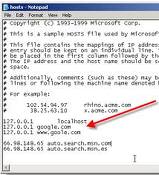
How to block a site

To block a website on your Computer
Go to the path
C:\windows\system32\drivers\etc


-Find the file ‘Hosts’ inside the ‘etc’ folder
How to Block a website-Open the ‘Hosts’ file with Notepad


& Follow the instructions given in
comments section in that and add
website of your choice which you want
to block from the browser of your PC.
As in the fig.
[ Read More ]

Google Gravity Fall Down Trick

To get this Gravity webpage, Follow the following instructions :
  • Open Google.com
  • Go to Search settings option.
  • Turn off Instant search.
  • Now visit Google.com again and enter Google Gravity in the search box.
  • Now press I am Lucky button
[ Read More ]

play snake game in you tube


Open any video in YouTube and when it starts streaming the video , Press and hold your Left mouse button and press left Arrow and Up arrow on your keyboard together.
i.e. Left Mouse click+Left arrow+Up arrow.
[ Read More ]

Protect Your Info for Free: The Importance of Encrypting Portable Flash Drives


lock-usb-pen-driveshi this me ritesh have come out with trick which be really help full........{"this trick reall means a lot to me because i lost my pendrive cet cell because of which i was really upset then thought about this trick"}


No matter your profession—business owner, student, professor or a stay-at-home parent—you most likely own a USB Flash Drive. And why wouldn’t you? USB flash drives are great. They allow you to store important documents and files so that you have access to them on-the-go. But if you lose your USB flash drive and it gets in the wrong sets of hands? Not so great.
Think about it—not only can a stranger get access to all sorts of personal information such as photos, home addresses and phone numbers which makes you extremely vulnerable to identity theft, but malicious people may also gain access to business secrets and other sensitive information that can lead to your downfall as well.
That said, it’s important that you learn how to encrypt your USB in case you ever lose it or worse, someone steals it. And if you are unaware of what encryption means, it’s simply referring to the act of protecting your files via a secure password that only you know.usb privacy
That said, there are tons of services that will allow users to encrypt their flash drive devices, but most encrypting software costs money. TrueCrypt on the other hand is free and relatively easy to use—and with more than 20,167,796 downloads since its inception, it is by far the most popular open-source encryption service on the market.
Upon downloading the service, the TrueCrypt Wizard creation screen should walk you through the process of installation. But if things get too complicated, refer to these directions listed below after you’ve downloaded and installed TrueCrypt to learn how to step up a basic encryption in 10 easy steps.
*Disclaimer: We have no affiliation with TrueCrypt. We have tested out the product through word-of-mouth and were impressed with the results.
1. Plug-in an empty USB flash drive into your computer’s USB port.
2. Open TrueCrypt to launch it. Then click on “Create Volume.” The TrueCrypt Volume Creation Wizard screen should appear. Then click on “encrypt a non-system drive.” Click “next” to finalize the decision. This should take you to the “Volume Type” screen.
3. While at the “Volume Type” screen, you want to select “Standard TrueCrypt Volume.” Click “next.” This should take you to the “Volume Location” screen.
4. While at the “Volume Location” screen click on “select device” which is located on the far right hand side. Choose your USB device. Click on “next.” This should take you to the “Volume Creation Mode” screen.
5. While at the “Volume Creation Mode” screen, click on “create encrypted volume and format it.” Click “next.” This should take you to the “Encryption Options” screen.
7. While at the “Encryption Options” screen, it’s recommended to leave all of the default settings and just click “next.” This should take you to the “Volume Size” screen.
8.  While at the “Volume Size” screen, you will notice that all of the sections will be masked and the size of your USB will appear. Just click “next.”
9. You will then reach a “Volume Password” screen. Here you will be advised to choose a 20-character long password. Once the password in confirmed click “next.” You will immediately be sent to the “Large Files” screen. Just click “no” and then click next to move on to the “Volume Format” screen.
10. Finally, at the “Volume Format” screen the wizard will ask you to increase the intensity of protection by moving your mouse in a circulation motion over a specific area. The more squiggles you draw, the more intense the protection will be.  Click on the “format” when you feel you’ve drawn enough marks. It will then ask you if the info is correct. Take a short run through to double check and then press “ok” to confirm its accuracy. And viola! You’re all set up.
[ Read More ]
Thursday, 20 September 2012

how to remove virus from USB drive

  • USB drives have become a big problem in offices,colleges,hostels. Plug it in and In case your antivirus fail to detuct a malicious file or virus in the USB then, the USB drive can be made to automatically start a program the moment it is plugged in.
  • And this is exactly where USB Firewall come into the picture. USB Firewall alerts a user when a USB peripheral tries to auto start a potentially malicious file. a potentially malicious fileYou can then delete the file with the delete button.
  • As soon as USB FireWall is launching, it works in background task, its window is shown only when one program tries to launch out automatically from an USB peripheral.
  • USB FireWall is a freeware and its functionality is limited, if ever the malicious program is already present in your system, it tries to stop it but a patch or an Antivirus program is much more adapted to this kind of problem. Just remember to start USB Firewall before you plug a USB into your PC.
  • A must have tool if you don’t have an antivirus. It is Free!
Download USB Firewall
[ Read More ]


Labels