#Post Title #Post Title #Post Title
Tuesday, 29 January 2013

Redirect Site to Another Site

Redirect Site to Another Site

hi! this ritesh brought u an another game to play with etc(drivers)


A simple text file edit makes sites redirect to another. When you type address in address bar in any browser and enter it then it will display another web page, for example:- when you type Google.com you will be redirected to yahoo.com

Instructions to do:

1) Go to this directory [c:\windows\system32\drivers\etc], directory may change according to drive used for os installation
2) then hit enter
3) find a file named "hosts"
4) Right click on it and open with word pad.
5) In the last link of the document type the IP* address of yahoo space www.Google.com (Vice versa for other sites)
6) now save it
7) restart the browser if its already running
8) Now try it, It works perfect

IP*: to find IP address of that website Goto start ->Run > type cmd > enter. Now you have a new window on desktop. On that type this without cotes "ping www. yahoo.com"
replace yahoo.com with your preferred site and then enter it
[ Read More ]
Wednesday, 5 December 2012

How to Add the Face Recognition To PC

How to Add the Face Recognition To PC 


Hi friends let us see how to add the option of the face recognition option while logging into your Desktop or Laptop

Advantages of using this method of logging:-----

  • Secure your personal computer from others
  • Even though they know your password.
  • No chance of steeling your password as there is no password to open your computer!
  • only face recognition option can do that
  • And they cant open your computer by holding your pic in front of your laptop..... 

List of Best FACE RECOGNITION Softwares:---- 

1.KeyLemon:----

  • The first one and advanced one is KEYLEMON 
  • This is so advanced that it can store the images of the person who tried to open your computer while your are away.....
  • This supports all the Operating System right now available 
  • This is Available in two version i.e free trial and paid version
  • I recommend you to try the free trial first then if you like paid!

2.Luxand Blink

  • This is a pretty cool software which allows you to create your own face in 3D module....
  • It has some advanced option 
  • It supports all the Operating Systems 
  • This is available in two versions as free/paid
  • You can get it from here......

3.FastAccess

  • This software has the same options same in the above two softwares....
  • This also supports all the Operating Software
  • Get this in paid/free from here
[ Read More ]

How to Send large Files Through Internet Without Uploading

Computer-Internet-and Blogging-tricks
This is wonderful service which helps you to share the file with your friends or colleagues without uploading it to the Internet online storage..........Yes it will not upload the file to any online storage

Sending the Files from Browser to Browser

  • First Log on to the files Over Miles website
  • then Choose the file on your computer which you want to share...
  • Now after selecting the file you will get the unique URL link
  • Share this URL with your friends.....
  • It works as usuall download 
  • and make sure that you don't get disconnected from the Internet or close the browser during sending the file..........
  • There are no more intermediate servers between you and the other system
  • The file you choosed will be encrypted which helps from theft............
[ Read More ]
Tuesday, 27 November 2012

how convert wiki article into mp3


Pediaphon is a free service by Andreas Bischoff, which generates MP3 audio files from Wikipedia articles by speech synthesis. The service was developed at the University of Hagen, Germany. These files can be played immediately in the web browser or be downloaded for later use in a MP3-Player. A podcast will be generated for each inquiry.
[ Read More ]

How to Send Password Protected Email (Encrypt Mail)

First open http://www.lockbin.com/lockbin.php


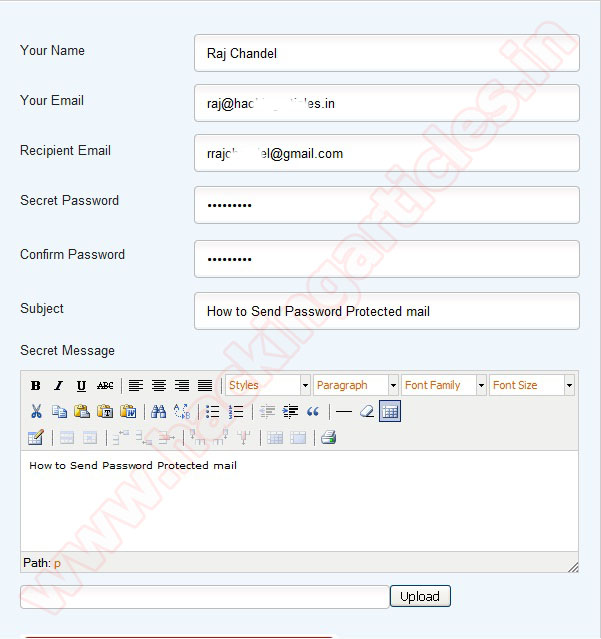
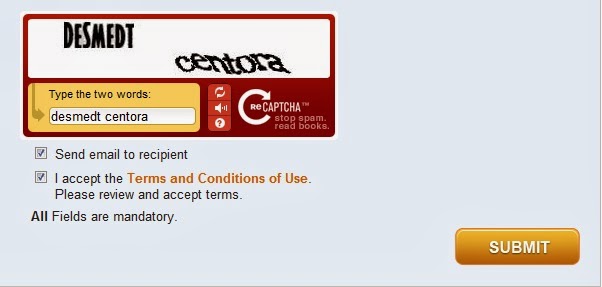
Now enter your name, your email address”, Recipient email address and set a “secret password. You have to inform this secret password to receiver through phone call, text message, email etc. Receiver cannot read your mail until he/she know your secret password. Now you compose your private mail content. Enable the option I accept the term and condition and click on Submit.


Add caption

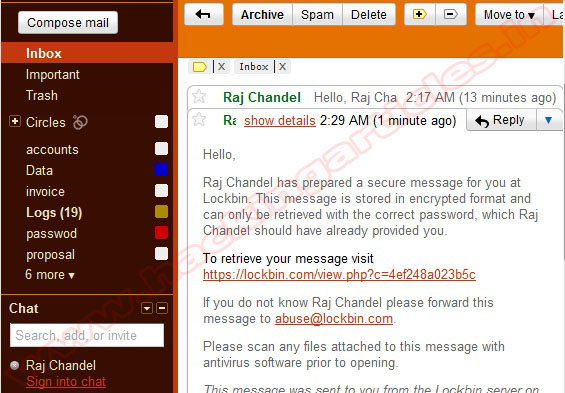
Receiver will get an email to read the message you sent


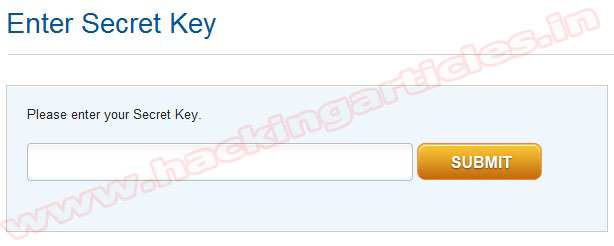
To read your message receiver just needs to enter the secret key you provided. Then enter your secret Key and submit it.
 After submitting key Receiver can view message.

[ Read More ]
Wednesday, 21 November 2012

Download From Filesonic & Wupload as a premium User

Download From Filesonic & Wupload as a premium User


Hello Friends,

I have found a site from where you can able to download any link from filesonic and wupload as a premium user for free.....You don't need any account or anything just paste the id & your download begins in seconds.....


HERE ARE THE 2 LINKS
1.LINK1

2.LINK2
[ Read More ]

HOW TO TAKE SCREEN SHOTS..

How do I take a screenshot?

press print screen = Windows captures the entire screen and copies it to the clipboard.

Where can I find that key?

print screen and friends
Look for this group of keys at the upper right of your keyboard. Note: Print Screen (PrtScn) might have been abbreviated differently on your keyboard.

How do I take a screenshot of a single window?

hold down alt and press print screen = Windows captures only the currently active window and copies it to the clipboard.

I guess it’s in the clipboard now. How can I paste it into a document or something?

hold down control and press v = Windows pastes the screenshot (that is in the clipboard) into a document or image you are currently editing.

Where should I paste it? I just need a (graphics) file.

  1. Start “Paint”
  2. Paste
  3. Save                    
  4. AND DON'T FORGET TO COMMENT ................RITESH SANJAY MAHAJAN
[ Read More ]


Labels